 PZ Manual
Check the selected map floor and your game patch before treating a basement mismatch as missing geography. Build 42 combines unique authored underground spaces with generated locations, and the official overview says world seeds affect some generated basements. An online surface render cannot establish which underground space your save contains.
Source review is not a game test or a guarantee for every patch, operating system or mod list. Record your exact game/server patch and relevant mods, then compare the author or official instructions linked below.
Separate authored locations from generated spaces
“Fixed” here distinguishes authored map content from a generated comparison. It does not mean every online image proves an identical entrance or interior in every save. Keep a named location and a generated example as different evidence.
| Reference type | What it can tell you | What to verify |
|---|---|---|
| Surface map | Roads and building footprints for the render’s version. | Which floor is displayed; whether the relevant entrance can actually be reached. |
| Unique authored underground location | A deliberately made underground space referenced by the game’s map content. | The matching game/render version, location and floor. |
| Generated basement | Some underground content depends on generation; the official overview identifies seed influence. | Your world’s known seed, version and active map mods; then the actual entrance/space. |
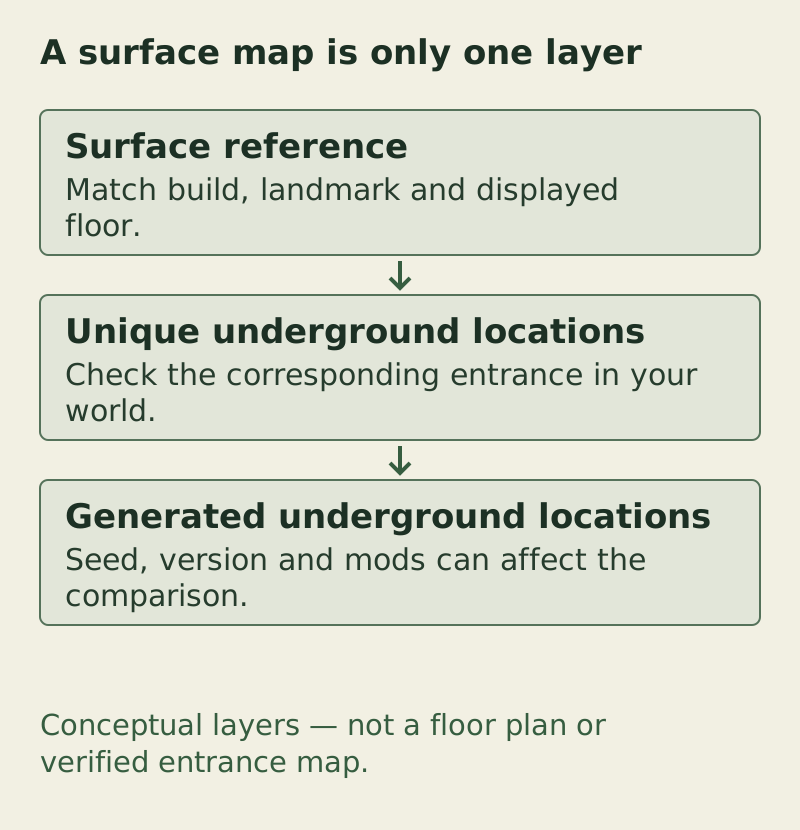
Conceptual layers — not a floor plan or verified entrance map. The complete checks and exceptions are provided in the text/table on this page.
PZ Manual · original task diagram · Conceptual diagram, not a game screenshot · PZ Manual editorial method
Open the larger diagramSource: The Indie Stone · Features Overview: Build 42.20 · Official feature overview · 42.20
Read the floor and overlay before travelling
PZmap’s reference interface includes B42/B41, coordinate units and a Basements overlay. For ordinary browsing, you do not need its Load Save or trimming tools; those are separate operations on world data.
- Record the actual game patch and any map mods. Open the external map entry and read its displayed build/mode.
- Find a visible surface landmark, such as the street junction beside the intended building, before changing underground layers. This gives you a point to return to when an overlay becomes confusing.
- Inspect the viewer’s Basements overlay and floor controls. Read what that layer represents instead of assuming every symbol is an entrance present in your world.
- Switch to the relevant lower floor and compare the same building. Keep the floor label with any coordinate reading; x/y without a floor is incomplete.
- In your own world, confirm the actual entrance and the accessible lower level. If the entrance or interior differs, use the comparison table below before changing save files.
Source: Open PZmap · B42/B41 map and coordinate tools · Map operator interface · reviewed 12 October 2026
Keep the seed with the version, not as a universal key
The official Seed Saving description says world seeds determine the locations of some generated elements, including basements. If you already know the world’s seed, keep it with the exact patch and mod list when comparing two saves. If not, mark it unknown rather than inserting a sample seed from a guide.
Even a matching seed does not establish equivalence across different patches, map mods or generation settings. Compare those inputs before using a second save or shared picture as evidence. The useful question is whether the same location under the same known conditions matches, not whether one number guarantees every basement.
Source: The Indie Stone · Features Overview: Build 42.20 · Official feature overview · 42.20
If the online map and your basement differ
A static screenshot can show a useful example without representing your save. Start with the version/floor/input comparison; deleting explored chunks is not the first response to a website disagreement.
| Mismatch | Next comparison |
|---|---|
| The viewer shows only the roof or ground floor | Change the selected floor and inspect the underground overlay before judging the interior. |
| Surface streets differ as well | Check B41/B42/render label and active custom maps; first match the same surface landmark. |
| Surface matches; underground space differs | Distinguish an authored reference from a generated example, then compare known seed/version/mod conditions. |
| An expected entrance is absent or unusable | Record the actual building/access side and the viewer reference. Do not turn the marker into a guaranteed route. |
| Only one save or server differs | Compare world age/generation and active profile/mod revisions; retain both saves while collecting evidence. |
| Coordinates point to the wrong object | Check Tile/Chunk/Cell units and floor, then match neighbouring roads rather than converting a pair from memory. |
Source: The Indie Stone · Features Overview: Build 42.20 · Official feature overview · 42.20
Source: Open PZmap · B42/B41 map and coordinate tools · Map operator interface · reviewed 12 October 2026
Source: The Indie Stone · 42.20 comparison and town gallery · Official map update · 27 July 2026
Turn a comparison into an actionable next step
If both the surface block and floor are wrong, return to the map-use guide and select the correct reference first. If the surface matches but the basement is a generated example, collect the world inputs and compare an actual entrance in the save. For a custom-city mismatch, identify the map item before expecting a vanilla viewer to show it.
For example, “same road junction, B42 render, lower floor, seed unknown, different underground room” preserves what you established. “The map is wrong” loses the floor and generation distinction that another player needs to reproduce the comparison.
Source: The Indie Stone · Features Overview: Build 42.20 · Official feature overview · 42.20
Copy a floor-aware location observation
Basement comparison note
Game patch / map mods / active save or profile:
World seed: known value / unknown
Online map URL / displayed build / overlay:
Surface building / neighbouring junction:
Coordinate units: Tile / Chunk / Cell / unknown
Observed X / Y / floor:
Authored reference or generated example / evidence:
Actual entrance / accessible lower level:
Difference from reference / first useful comparison:
Fill in coordinates only when you actually read them. This note is not a verified entrance or teleport command.
Source: Open PZmap · B42/B41 map and coordinate tools · Map operator interface · reviewed 12 October 2026
Choose the next branch
Sources & verification
Feature distinctions are official statements; comparison steps are editorial advice. No fixed entrance catalogue, guaranteed contents or cross-version seed reproduction is supplied.
- The Indie Stone · Features Overview: Build 42.20Read 13 October 2026. Basements section distinguishes unique and generated underground locations. Seed Saving says world seeds determine some generated elements, including basements. Also supplies the official crop image used in this release. Not a current-save survey or a guarantee across game versions/mods.
- Open PZmap · B42/B41 map and coordinate toolsPublic interface exposes B42/B41 & Mapping grid modes, Cell/Chunk/Tile coordinate display, POIs, Streets and Basements. Created by Calvy; hosting credited to The Indie Stone. A map render is not a live view of your save.
- The Indie Stone · 42.20 comparison and town galleryReviewed 13 October 2026. Official comparison says Build 42 doubled surface area and identifies western additions Brandenburg, Ekron and Irvington. The 42.20 gallery separately labels Rosewood downtown / Kentucky State Penitentiary and Riverside Sunset Bar / Art gallery. Images are orientation references, not exact current-game coordinates or loot evidence; no square-kilometre total is supplied.