 PZ Manual
The Indie Stone says Build 42 doubled the map’s surface area compared with Build 41. That is an area comparison, not a claim that every road trip is twice as long. The cited announcement does not give a square-kilometre total, so this guide does not invent one.
Source review is not a game test or a guarantee for every patch, operating system or mod list. Record your exact game/server patch and relevant mods, then compare the author or official instructions linked below.
Use the official comparison with the right units
| Statement | What it means for planning |
|---|---|
| B42 has twice B41’s surface area | Compare horizontal world coverage, not a screen image’s pixel dimensions. |
| More floors or basements | These add places to explore without making their surface footprint extra land. |
| More buildings or art tiles | These are content counts, not square kilometres. |
| A longer journey | Measure your actual route; area ratio is not a travel-time multiplier. |
Source: The Indie Stone · 42.20 comparison and town gallery · Official map update · 27 July 2026
Compare area, added towns and refreshed towns
Open the official article below and compare its Build 41 / Build 42 images before the town gallery. These are the developer’s visual comparison, not a scaled geography diagram produced by this site.
| Comparison | Official evidence | What to do with it |
|---|---|---|
| B41 surface-area baseline = 1 | Baseline in the official side-by-side comparison. | Use the B41 image as a coverage reference, not a measured km² total. |
| B42 surface area = 2, normalized to B41 | Official doubled-area statement; ratio is normalized editorial notation. | Inspect the larger coverage in the paired images; do not double a travel-time estimate. |
| Western additions | Brandenburg, Ekron and Irvington identified in the official overview. | Choose the town first, then inspect the wider approach road. |
| Familiar-town refresh | 42.20 gallery includes Rosewood and Riverside reworks. | Recheck the same block/floor even when you remember the town. |
Source: The Indie Stone · 42.20 comparison and town gallery · Official map update · 27 July 2026
Choose the destination before planning the trip
- Write the destination name and whether you need a western addition or a refreshed familiar town.
- For a new western town, inspect the broad connecting roads and an earlier return junction; do not extrapolate from your old town loop.
- For a familiar town, zoom to the actual block and floor. Check the building and access side instead of using the old interior as your plan.
- Label the chosen render and your actual game patch/save age. Keep a custom-map item separate from the official area comparison.
- Record what you confirmed at the destination and revise the next trip from that observation.
Source: The Indie Stone · 42.20 comparison and town gallery · Official map update · 27 July 2026
Read the paired official top-down images
Read the version labels inside the images: the first is Build 41, July 2019; the second is Build 42, July 2026. The b42 text in the original file names is not their version label. Both are presented at the same width and full aspect ratio, including the source labels.
Use the common frame and river outline to orient the comparison, then inspect the expanded western coverage. The doubled-area statement concerns horizontal map surface; the images do not add every basement or upper floor as extra land.
Open either larger local image when the bottom label or road detail is too small. Do not measure pixel coverage as km², and do not assume the larger overview means every district has already received the same town refresh. Choose a destination and compare its actual block next.
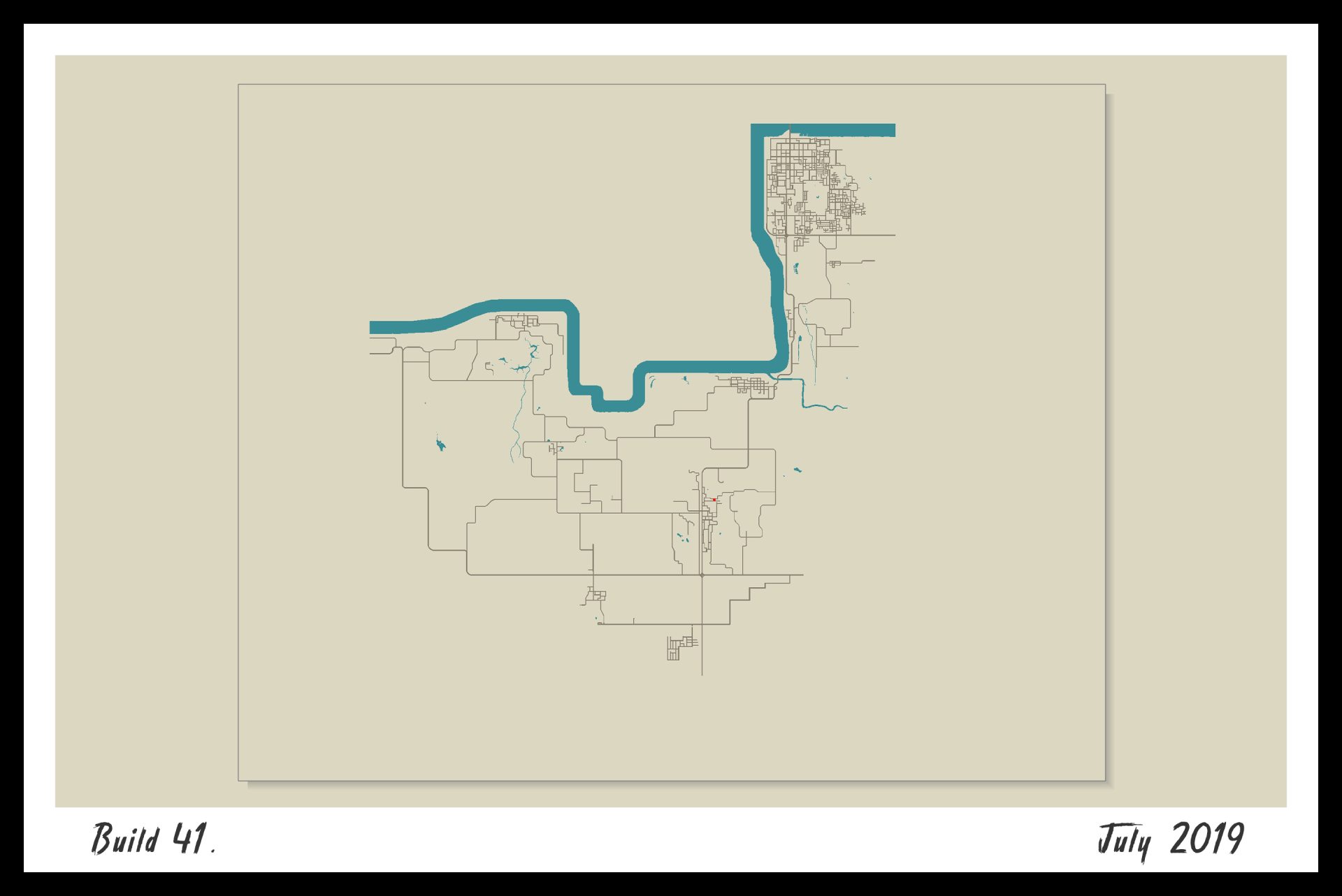
The 2019 B41 comparison image: use the same frame and river outline as the B42 image below; the source filename is not the build label.
© The Indie Stone · Official B41 · July 2019 map comparison · 42.20: The Big Glow Up
Open the larger image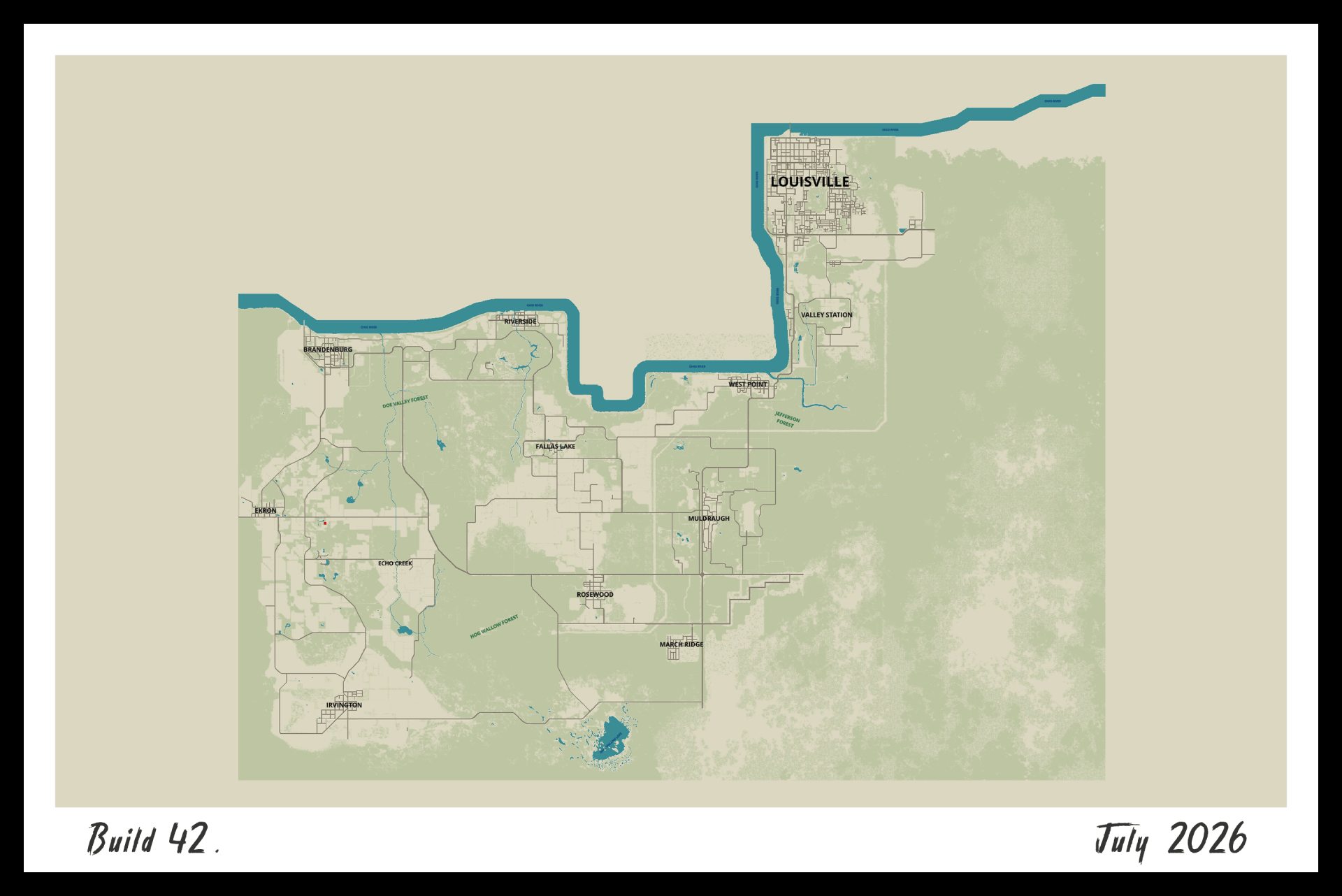
The 2026 B42 comparison image: inspect the expanded western coverage while keeping the same overall frame. Surface coverage is separate from interiors and floors.
© The Indie Stone · Official B42 · July 2026 map comparison · 42.20: The Big Glow Up
Open the larger imageSource: The Indie Stone · 42.20 comparison and town gallery · Official map update · 27 July 2026
Expansion and town rework are different changes
The official overview identifies western additions including Brandenburg, Ekron and Irvington, alongside reworked established towns. More territory and changes inside familiar places are separate reasons an old route can need revision.
For a returning character, pick the destination first. If it is in an unfamiliar area, inspect the wider road connection before committing to a long drive. If it is in a familiar town, recheck the block and entrance instead of assuming a remembered interior still applies.
Source: The Indie Stone · 42.20 comparison and town gallery · Official map update · 27 July 2026
Compare maps without manufacturing a square-kilometre figure
- Record the full game build and whether you are comparing a new world, an older save or a modded map.
- Open the same broad area in an appropriate B41 reference and a B42 render. Match map orientation and location before comparing boundaries.
- Use the viewer’s coordinate/grid mode consistently. A bounding rectangle, rendered background and actually populated map area are not automatically the same measurement.
- If you need a route distance, use the map’s measurement or route function for that particular origin and destination, then allow for your vehicle, obstacles and detours. Do not derive it from the two-times-area statement.
- Keep any externally quoted km² number separate until its author supplies the build, included region and measurement method. This page has no independently verified absolute-area figure.
Which map should a 42.20 or 42.21 player open?
The map-use guide links operators and explains their labels. ZomboidMap currently displays Build 42.20; use that label as a source boundary when comparing a 42.21 game. A later game patch can contain local changes even when the broad geography remains recognizable.
If a familiar building differs, first check version, floor and map mods. Do not treat the size comparison as an instruction to replace an existing world. The safest useful result here is a correctly labelled map and a checked destination, not an unverified total area.
Source: Open ZomboidMap · town and resource search · Independent map operator · displayed Build 42.20
Choose the next branch
Sources & verification
These guides compare public map interfaces and attributed reference material. PZ Manual has not run a game route, surveyed current loot or verified the map against a local 42.21 installation. Route choices and recording checklists are original editorial advice.
- The Indie Stone · 42.20 comparison and town galleryReviewed 13 October 2026. Official comparison says Build 42 doubled surface area and identifies western additions Brandenburg, Ekron and Irvington. The 42.20 gallery separately labels Rosewood downtown / Kentucky State Penitentiary and Riverside Sunset Bar / Art gallery. Images are orientation references, not exact current-game coordinates or loot evidence; no square-kilometre total is supplied.
- Open ZomboidMap · town and resource searchInterface rechecked 13 October 2026: displayed Build 42.20, Rosewood/Riverside town entries, Fire Dept/Police/Hardware/Grocery/Medical POIs, Wells/Gas pumps filters, right-click coordinate copying and [ / ] floor controls. Rosewood search became stuck/timed out; no exact POI coordinates or share link were verified. Independent fan-made map; exact 42.21 tile coverage, save state and routes remain untested.