 PZ Manual
This workflow is for Project Viewpoint. First confirm the camera works and Delete opens its settings. Record the working preset, compare a built-in look in one scene, then try one custom pack. If the custom pack fails, restore the built-in baseline before changing loader files or stacking more render addons.
Source review is not a game test or a guarantee for every patch, operating system or mod list. Record your exact game/server patch and relevant mods, then compare the author or official instructions linked below.
Confirm the camera and settings before changing shaders
Begin in a separate test world with the known working camera setup. Keep your normal collection and save intact while comparing graphics changes. If a loader never starts, a shader preset cannot supply the missing installation step.
| Checkpoint | What to do |
|---|---|
| Viewpoint camera renders a world | Continue with this page; preserve that working configuration. |
| Delete opens Viewpoint settings | Record the exact controls and values available in the installed release. |
| No camera or no settings window | Return to the Viewpoint installation guide: loader, mod enablement and approval come first. |
| You installed PZ3D instead | Use the PZ3D guide. Viewpoint’s settings and pack directory are not PZ3D instructions. |
Source: Project Viewpoint · author Workshop page · Mod author instructions
Separate appearance, graphics presets and terrain detail
The 13 October author notice advises AMD users experiencing crashes to set Graphic Preset to Medium until a hotfix, and describes switching Terrain Relief off through World → Detail. Record the installed release and exact symptom before following that temporary advice; it is not a tested fix for every AMD card or every crash.
The existing installation guide covers the alpha-0.1.6 texture-compression and platform notices. A shader appearance, a graphics preset and a VRAM requirement answer different questions; record them in separate fields.
| Author-labelled control | Use it for |
|---|---|
| Vanilla / Default / Vivid looks | Choose a built-in appearance, then compare the same scene. |
| Graphic Preset Medium | A separate graphics preset named in the author’s temporary AMD crash notice; it is not a fourth shader look. |
| World → Detail → Terrain Relief | A separate terrain-detail toggle that the author says can be switched off. |
| Optional custom shader pack | A separately obtained pack with its own author, version and requirements. |
Source: Project Viewpoint · author Workshop page · Mod author instructions
Source: Project Viewpoint · author change notes · Mod author release notes
Compare built-in looks before a custom pack
- Open Viewpoint settings with Delete and record the active built-in look, Graphic Preset, terrain-detail state and resolution. Keep a screenshot of the working values.
- Choose one built-in look in the installed settings. Keep the character at the same location and compare the same game time, floor and camera direction.
- Inspect a useful test scene: a road/building edge, a doorway and one lit or shadowed surface. Record a visible defect instead of just calling the whole image worse.
- If the new setting causes a problem, return to the previous working value before trying another option. If a restart is requested by the installed setting, finish it before comparing.
- Once a built-in baseline is repeatable, decide whether a custom pack is needed for your actual goal. Changing several effects, model packs and resolution together hides which change mattered.
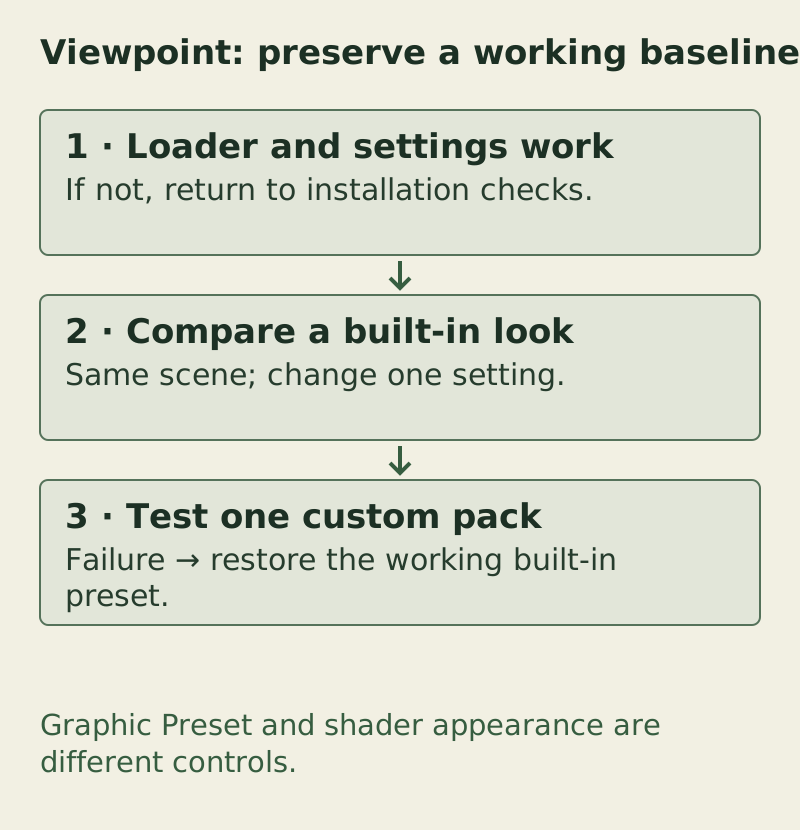
Graphic Preset and shader appearance are different controls. The complete checks and exceptions are provided in the text/table on this page.
PZ Manual · original task diagram · Conceptual diagram, not a game screenshot · PZ Manual editorial method
Open the larger diagramSource: Project Viewpoint · author Workshop page · Mod author instructions
Locate the custom-pack directory without inventing a package recipe
The author identifies Zomboid\viewpoint-shaderpacks as the custom-pack directory. Find that directory for the user/profile actually running the game and compare it with the installed release’s instructions. Do not substitute the Steam game directory merely because another mod copied a loader there.
The author labels Iris-compatible Minecraft shader support experimental and says proper custom-pack documentation is still forthcoming. This reference does not prescribe whether every ZIP should be extracted, a universal internal folder layout or an absolute path valid on every operating system. If the release does not explain the chosen pack’s packaging, ask through the author route with the exact pack/version instead of guessing.
Viewpoint custom-pack directory reference
Zomboid\viewpoint-shaderpacksAuthor directory reference, not a terminal command or a universal absolute filesystem path.
Source: Project Viewpoint · author Workshop page · Mod author instructions
Choose a pack source and keep its identity
| Pack search | Author entry and limit |
|---|---|
| Photon | Use sixthsurge/photon and its own release links. It is a Minecraft shader project, not a certified Viewpoint preset. |
| Hysteria | Use ElocinDev’s Hysteria Shaders Modrinth entry. Minecraft/Iris scope does not establish a Viewpoint version pairing. |
| A pack name from a tutorial | Check that pack’s author, downloaded release and requirements before using it. A similarly named repost is not the same file. |
- Save the pack name, version, author URL and filename before changing the setup. Preserve the built-in look that worked.
- Follow the installed Viewpoint release’s supported custom-pack selection route. Select one pack and compare the same scene used for the baseline.
- If the pack is absent from the selector, first check the directory/user profile and any packaging instructions actually supplied. Do not rename random files to force recognition.
- If a selected pack renders incorrectly, switch back to the known built-in look and remove only that optional pack from the test setup if needed. Keep its identity and first error for a report.
Source: Project Viewpoint · author Workshop page · Mod author instructions
Source: Photon · sixthsurge author repository · Shader author repository · Minecraft scope
Source: Hysteria Shaders · author Modrinth project · Shader author project · Minecraft scope
Match the failure to the next check
| Observed failure | Next check |
|---|---|
| Delete settings does not open | Verify camera/mod/loader checkpoints in the installation guide before adding packs. |
| Built-in works; one custom pack fails | Restore the built-in baseline. Record exact pack/version, packaging source and first error. |
| AMD crash during rendering | Compare the current author Medium/Terrain Relief advice with the installed release. If it fails, preserve the first error instead of adding more effects. |
| Only a particular object is absent | Check Viewpoint’s model coverage/optional model content. An unmodelled object is not automatically a lighting problem. |
| Texture or memory warning | Record GPU, VRAM, resolution and the relevant author setup notice; client heap and video memory are separate. |
| Performance worsens after a change | Compare one setting in the same scene. Record resolution/preset and symptom; no FPS gain or universal optimum is promised. |
| Only multiplayer differs | Compare server/client mod revisions and the smallest failing setup before blaming the pack alone. |
Source: Project Viewpoint · author Workshop page · Mod author instructions
Source: Project Viewpoint · author change notes · Mod author release notes
Recover and keep the test useful
- If settings remain accessible, select the built-in look that previously worked and restore the last changed graphics/detail value.
- Restart when the installed release requires it, then return to the same test scene. Confirm the baseline rather than assuming a saved setting proves recovery.
- If a new optional pack prevents reaching settings, close the game and undo only that pack/setup change using the instructions you followed; keep its files and configuration as evidence outside the active test.
- If the camera still fails without the optional pack, use the installation guide’s loader/enablement and removal sequence. Do not mix an old temporary JAR with unrelated current files.
- Keep the successful values for the next comparison. Reintroduce optional changes one at a time.
Source: Project Viewpoint · author Workshop page · Mod author instructions
Copy the same-scene comparison
Viewpoint shader comparison
Game patch / Viewpoint release / loaded ZombieBuddy:
OS / launch method / GPU / VRAM / resolution:
Scene / game time / floor / camera direction:
Working built-in look / Graphic Preset / Terrain Relief:
Single changed setting or pack / exact version / author URL:
Visible defect or performance symptom / first error:
Result after restoring baseline / restart performed:
Keep look, graphics preset and terrain detail separate. This comparison does not predict FPS.
Source: Project Viewpoint · author Workshop page · Mod author instructions
Compare the setup before installing
Four source-based references. Author declarations and source checks are separate from game testing. A shared ZombieBuddy dependency does not prove that PZ3D and Viewpoint work together.
| Mod / feature | OS & dependencies | Game patch & multiplayer scope | Sources & verification |
|---|---|---|---|
| PZ3D0.7.2 (author Workshop) | Windows instructions; Linux author install page; macOS support pending. Official ZombieBuddy 2.3.4 or newer. | Exact game patch range not specified in this review. Author says multiplayer supported. Single-player test and exact server setup: unknown. | Author Workshop Author install page Source checked: |
| Project Viewpointalpha-0.1.6 (10 October author change notes) | macOS and Intel Arc unsupported; other OS coverage not enumerated in the reviewed entry. ZombieBuddy required. | Existing guide uses Build 42 author scope. Exact patch/mod-list compatibility: unknown. Author calls it multiplayer compatible, subject to server mod-list compatibility. Single-player test and specific server pairing: unknown. | Author Workshop Author change notes Source checked: |
| ZombieBuddySite source record: framework v2.3.4; Windows installer v4.2. Current installation guide is unversioned. | Author instructions cover native Windows, macOS and Linux. Steam Deck/Proton configuration: unknown. Java-mod framework; dependent mods have their own requirements. | Author Workshop lists B41 and B42.12–B42.21. This does not give its dependent mods B41 support. Author FAQ says it works on multiplayer. Client/server installation and dependent-mod pairing: unknown. | Author Workshop Author install guide Source checked: |
| Shaders / Viewpoint featureViewpoint alpha-0.1.6: Vanilla / Default / Vivid; experimental custom Minecraft/Iris support. | Viewpoint platform caveats apply; shader-specific OS coverage not stated. Viewpoint and its ZombieBuddy requirement. | Shaders are a Viewpoint feature, not a separate mod. Photon and Hysteria are Minecraft projects; Project Zomboid pairing is unverified. No individual shader pack/server pairing stated or tested. | Author Workshop Author change notes Source checked: |
Steam client availability is unverified: public page banners and author descriptions were inconsistent when checked. Use the author item itself and confirm its current status in your client. No installer, save, GPU, shader pack or server combination was tested here.
Choose the next branch
Sources & verification
Installation gates and pack-directory identity come from author documentation. Controlled comparison and recovery steps are editorial advice. Minecraft pack-author links identify sources, not tested Viewpoint combinations.
- Project Viewpoint · author Workshop pageRead 13 October 2026. Author Workshop 3809306528, mod ID Viewpoint; dependency, settings, custom pack directory and experimental Iris compatibility. Current description warns about outdated addons and unintended terrain relief. No independent game test. Current author notice asks AMD crash cases to use Graphic Preset Medium until a hotfix, and locates Terrain Relief under World > Detail. Temporary advice, not a tested fix or fourth built-in shader look.
- Project Viewpoint · author change notesRead 12 October 2026. Latest public entry: 10 October alpha-0.1.6. Includes revised setup, experimental upscaling, Minecraft shader changes, texture compression below 12 GB VRAM and unsupported-platform warnings. Performance claims are the author’s, not measurements by PZ Manual.
- Photon · sixthsurge author repositoryRead 12 October 2026. Author repository for Photon Minecraft shaders. Follow its own release/download links; no Project Viewpoint shader test or supported-version pairing established here.
- Hysteria Shaders · author Modrinth projectRead 12 October 2026. ElocinDev’s Hysteria project identifies Minecraft/Iris compatibility. This verifies its author source, not compatibility of any pack release with Project Viewpoint.