 PZ Manual
For Windows, start with kolpaque’s Workshop item 3807334881, install official ZombieBuddy 2.3.4 or newer using its author instructions, and enable pz3d. After spawning, use Insert or the left-side icon to enter 3D. Confirm the loader and mod first; an object without a model needs a different check from a loader that never starts.
Source review is not a game test or a guarantee for every patch, operating system or mod list. Record your exact game/server patch and relevant mods, then compare the author or official instructions linked below.
Identify PZ3D and the instructions you are following
Open the exact item below before changing files. Keep the game patch, installed PZ3D release and loaded ZombieBuddy version as separate entries in your note. A video showing the same camera angle can describe an older installation.
| Identity | Author entry reviewed 13 October 2026 |
|---|---|
| Author / Workshop ID | kolpaque / 3807334881 |
| Mod ID / displayed release | pz3d / 0.7.2 |
| Windows loader requirement | Official ZombieBuddy 2.3.4 or newer |
| Older PZ3D tutorial | The 0.6.0 custom pz3d Loader recipe is historical; compare current platform instructions before retaining its launch changes. |
Source: pz3d · author Workshop page · PZ3D author requirements and controls
Choose the current platform route
| Platform / route | Next action and source boundary |
|---|---|
| Windows / ZombieBuddy 2.3.4+ | Use the ZombieBuddy guide for the official loader, then enable pz3d. Do not add the historical custom loader on top of the current Windows setup. |
| Linux / author installation site | Open the author site below and read its current instructions/README. Its full JavaScript instructions and archive were not inspected here; no Linux command is supplied. |
| macOS / pending author notice | Check the current platform notice before installing. Workshop described support as pending on the review date. Loader support alone does not establish PZ3D support. |
Source: pz3d · author Workshop page · PZ3D author requirements and controls
Source: PZ3D · author installation and release entry · Mod author installation entry
Prepare a reversible first test
A separate world makes the comparison easier to reverse; it does not prove that all mods are compatible. Choose one camera mod for the first diagnostic comparison.
- Close the game, back up the save you care about and copy existing launch options or edited launcher files to a note.
- Confirm the ordinary game reaches its menu before changing the loader. Record the actual game patch and launch method.
- Use a separate disposable world with the intended camera mod and its stated requirements. Preserve the regular mod collection for later comparison.
- If an older PZ3D setup changed launch files, identify those edits and consult its matching removal instructions before adopting the current route. Preserve unrelated launch options.
Windows: install the loader, then enable PZ3D
- Subscribe to the exact PZ3D item and allow Steam to finish downloading it.
- Follow the linked ZombieBuddy guide for the official Windows installer or matching manual setup. Record which launch method you configured.
- Launch and check that the ZombieBuddy loading indicator appears with a version meeting the author requirement. If absent, work through the loader guide before changing camera settings.
- Enable pz3d in the game mod manager and check the selection used by the disposable test world. Fully restart after setup.
- Spawn in the test world and try the 3D toggle. Record separately whether the loader appeared, the world opened and the camera changed.
Source: pz3d · author Workshop page · PZ3D author requirements and controls
Source: ZombieBuddy v2.3.4 · installation guide · Versioned author documentation
Use the controls and check the actual binding
If Insert does nothing, inspect the current pz3d binding and try the author-described icon. If neither works, return to enablement and loader checks. Record a rebound key rather than repeating a default from a video.
| Author default | Use / check |
|---|---|
| Insert / left-side icon | Enter or leave 3D after spawning. Rebind through Options → Mods → pz3d. |
| Right mouse button | Click for ADS, hold for target mode; an item/tile click opens its context menu. |
| Mouse wheel | Camera zoom; container interaction uses quick actions. Compare the context you are in. |
| E | Ordinary interaction, including holding the key. |
| Tab | Tap for overlay; hold to use the cursor. |
Source: pz3d · author Workshop page · PZ3D author requirements and controls
Choose the PZ3D control for the task
For a useful control check, choose one stationary scene and one action. Record whether the icon, rebound key or hold/tap behavior changed, then return to the original state before trying the next control.
If you arrived from a general shader search, identify the camera project first. The separate shader workflow on this site is for Project Viewpoint; its pack directory and Delete settings do not configure PZ3D.
| Task / author default | What to compare in the test world |
|---|---|
| Camera: Insert or the left-side icon | Try the configured binding after spawning. If the key fails but the icon works, inspect Options → Mods → pz3d; if both fail, revisit loader/enablement before models. |
| Targeting: right mouse button | Compare click for ADS with hold for target mode. Clicking an item/tile is the context-menu case; note what was under the cursor. |
| Interaction: E / container wheel | Use the ordinary interaction context and inspect the targeted object. The mouse wheel has a different container quick-action context from camera zoom. |
| Overlay/cursor: Tab | Compare a tap for the overlay with holding Tab to use the cursor. Release the key and compare again so a held-cursor state is not confused with a failed camera toggle. |
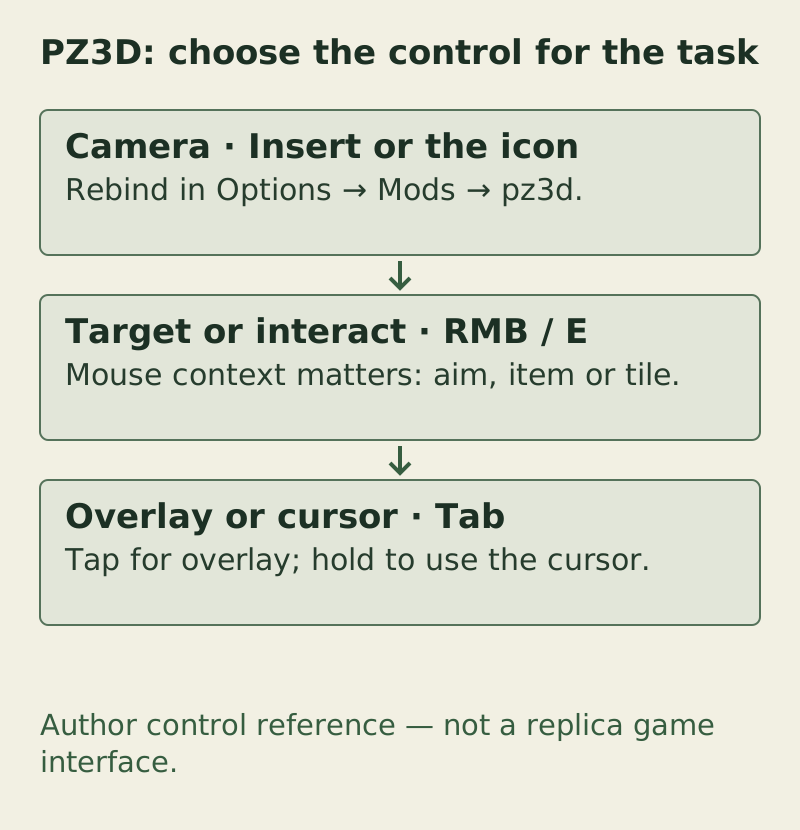
Author control reference — not a replica game interface. The complete checks and exceptions are provided in the text/table on this page.
PZ Manual · original task diagram · Conceptual diagram, not a game screenshot · PZ Manual editorial method
Open the larger diagramSource: pz3d · author Workshop page · PZ3D author requirements and controls
Separate missing models from a loading failure
The author describes incomplete model coverage and community model extensions. Use extension links from the exact author entry and record their identity; this guide supplies no complete model catalogue or claimed pack compatibility list.
| Observed checkpoint | Next useful check |
|---|---|
| No ZombieBuddy indicator | Check the active loader version, file placement and launch method in its guide. |
| Loader appears, but camera does not change | Check pz3d enablement for this world, the toggle binding and the first mod/approval error. |
| 3D works, but particular objects are absent or unfinished | Compare author model coverage and the exact extension/model pack enabled. Avoid reinstalling a working loader as the first response. |
| A model pack introduces a new failure | Preserve its item/version, remove that optional pack from the separate test and compare the same object. |
| Only multiplayer fails | Record client/server item revisions and the first error; a working local camera is not a multiplayer test. |
Source: pz3d · author Workshop page · PZ3D author requirements and controls
Keep PZ3D and Project Viewpoint setup separate
PZ3D is item 3807334881; Project Viewpoint is item 3809306528. The reviewed current Windows PZ3D instructions now use ZombieBuddy. The historical custom pz3d Loader is therefore not a current reason to say only Viewpoint uses that framework.
Bindings, graphics settings, model packs and platform requirements still belong to each project. For Viewpoint shader questions, use its guide; do not copy Viewpoint pack paths or camera keys into PZ3D. Test one camera project at a time when narrowing a failure.
Source: pz3d · author Workshop page · PZ3D author requirements and controls
Source: Project Viewpoint · author Workshop page · Mod author instructions
Read the author memory recommendation in context
The PZ3D author asks for at least 6 GB allocated to the game. Treat that as author guidance, not a measured optimal heap or a promise that six gigabytes fixes every loading problem. First identify the affected process and the exact memory error.
Use the RAM guide to inspect the active Windows client launcher if needed. Leave physical-memory headroom for the OS, native game allocations and any local server. A client heap change does not raise Host/dedicated-server memory or add GPU VRAM. If no memory-specific evidence exists, keep checking the earlier loader and mod checkpoints.
Source: pz3d · author Workshop page · PZ3D author requirements and controls
Source: The Indie Stone support · Client memory and launcher JSON · Administrator guidance · November 2023
Return to the ordinary view or remove the setup
- Use your configured 3D toggle if responsive, then exit the test session normally.
- Disable pz3d and its optional model extensions in the disposable setup and fully restart. Compare the ordinary view.
- Keep ZombieBuddy if other deliberately enabled mods need it. If removing it too, follow its uninstall guide to undo launcher injection before removing loader files.
- For a historical custom-loader installation, restore the specific launcher edits recorded for that setup using its matching instructions; do not assume Workshop unsubscription reverses copied files.
- Check the baseline world before reopening the save you care about. Removal does not establish repair of a save already affected by mods.
Source: ZombieBuddy · uninstall guide · Current author removal instructions
Report the checkpoint that failed
Use the Workshop author’s current support route and supply one reproducible sequence. Distinguish a failed launch, a nonresponsive toggle, a missing model and a multiplayer-only error. Keep the first error verbatim and review logs before sharing private paths or server details.
PZ3D diagnostic note
Game patch / OS / launch method:
PZ3D Workshop ID / installed release:
Loaded ZombieBuddy version / indicator seen:
Test world / enabled model packs:
3D toggle binding / icon result:
Missing object or first error:
Single-player or server / reproduction steps:
Fill in observed results. This site has not run this game test.
Source: pz3d · author Workshop page · PZ3D author requirements and controls
Compare the setup before installing
Four source-based references. Author declarations and source checks are separate from game testing. A shared ZombieBuddy dependency does not prove that PZ3D and Viewpoint work together.
| Mod / feature | OS & dependencies | Game patch & multiplayer scope | Sources & verification |
|---|---|---|---|
| PZ3D0.7.2 (author Workshop) | Windows instructions; Linux author install page; macOS support pending. Official ZombieBuddy 2.3.4 or newer. | Exact game patch range not specified in this review. Author says multiplayer supported. Single-player test and exact server setup: unknown. | Author Workshop Author install page Source checked: |
| Project Viewpointalpha-0.1.6 (10 October author change notes) | macOS and Intel Arc unsupported; other OS coverage not enumerated in the reviewed entry. ZombieBuddy required. | Existing guide uses Build 42 author scope. Exact patch/mod-list compatibility: unknown. Author calls it multiplayer compatible, subject to server mod-list compatibility. Single-player test and specific server pairing: unknown. | Author Workshop Author change notes Source checked: |
| ZombieBuddySite source record: framework v2.3.4; Windows installer v4.2. Current installation guide is unversioned. | Author instructions cover native Windows, macOS and Linux. Steam Deck/Proton configuration: unknown. Java-mod framework; dependent mods have their own requirements. | Author Workshop lists B41 and B42.12–B42.21. This does not give its dependent mods B41 support. Author FAQ says it works on multiplayer. Client/server installation and dependent-mod pairing: unknown. | Author Workshop Author install guide Source checked: |
| Shaders / Viewpoint featureViewpoint alpha-0.1.6: Vanilla / Default / Vivid; experimental custom Minecraft/Iris support. | Viewpoint platform caveats apply; shader-specific OS coverage not stated. Viewpoint and its ZombieBuddy requirement. | Shaders are a Viewpoint feature, not a separate mod. Photon and Hysteria are Minecraft projects; Project Zomboid pairing is unverified. No individual shader pack/server pairing stated or tested. | Author Workshop Author change notes Source checked: |
Steam client availability is unverified: public page banners and author descriptions were inconsistent when checked. Use the author item itself and confirm its current status in your client. No installer, save, GPU, shader pack or server combination was tested here.
Choose the next branch
Sources & verification
Current PZ3D requirements and controls are attributed to the Workshop author. ZombieBuddy installation and recovery remain in the separate loader guide. The test sequence and symptom triage are editorial recommendations. Model coverage, effective memory limits and game results remain unverified here.
- pz3d · author Workshop pageRead 13 October 2026. Workshop 3807334881 by kolpaque, mod ID pz3d, displayed release 0.7.2. Current Windows instructions use official ZombieBuddy 2.3.4 or newer; the 0.6.0 custom-loader recipe is historical. Author documents Insert and Options > Mods > pz3d, recommends at least 6 GB game RAM and describes incomplete model coverage. Linux goes to the author install site; macOS was pending. No platform, memory or multiplayer game test was run.
- PZ3D · author installation and release entryRead 13 October 2026. Server-rendered text links pz3d 0.7.2 and asks readers to follow its archive README; full installation instructions require JavaScript. Linux is directed here by Workshop; the full interactive instructions and archive were not inspected or executed.
- ZombieBuddy v2.3.4 · installation guideRead 8 October 2026 at release tag v2.3.4. Covers installer/manual setup, files, platform launch arguments, mandatory trailing separator and the loading indicator. Compare the installer UI with the release actually downloaded.
- Project Viewpoint · author Workshop pageRead 13 October 2026. Author Workshop 3809306528, mod ID Viewpoint; dependency, settings, custom pack directory and experimental Iris compatibility. Current description warns about outdated addons and unintended terrain relief. No independent game test. Current author notice asks AMD crash cases to use Graphic Preset Medium until a hotfix, and locates Terrain Relief under World > Detail. Temporary advice, not a tested fix or fourth built-in shader look.
- The Indie Stone support · Client memory and launcher JSONReviewed 12 October 2026. Beard distinguishes client from server memory and corrects the suggested JSON option to -Xmx, explicitly saying an -Xms line is unnecessary. Historical Windows launcher guidance; inspect the file shipped with your current installation.
- ZombieBuddy · uninstall guideRead 8 October 2026. Documents installer removal, agent arguments, copied loader files and optional config cleanup. The editorial steps also account for launcher JSON/BAT edits documented in the installation guide.